
TL;DR
- Correct IP geolocation by generating Geofeeds with an interactive map and automatically generated ISO codes.
- Monitor the geolocation of all your IP resources in one page, detect discrepancies, and automatically request corrections from providers.
- Host Geofeeds on PacketVis or publish them under your own domain.
- Downloadable geolocation reports, ideal for IP leasing negotiations.
- Manage & automate IP geolocation in bulk and integrate with your systems through REST APIs.
Accurate IP geolocation is essential to avoid service restrictions, incorrect content availability, and unnecessary support requests. However, managing geolocation across multiple providers can be challenging.
RFC 9092 (updated by RFC 9632) helps network operators publish IP geolocation data. However, ensuring that geolocation providers and content providers actually use this information requires continuous monitoring.
PacketVis simplifies this process with a centralized platform to create, publish, monitor, and correct IP geolocation information.
Create Geofeeds Easily
PacketVis offers an interactive wizard that guides users through declaring the geographic location of an IP address or prefix. Simply enter an IP address or prefix and select its location using the search function on an interactive map.
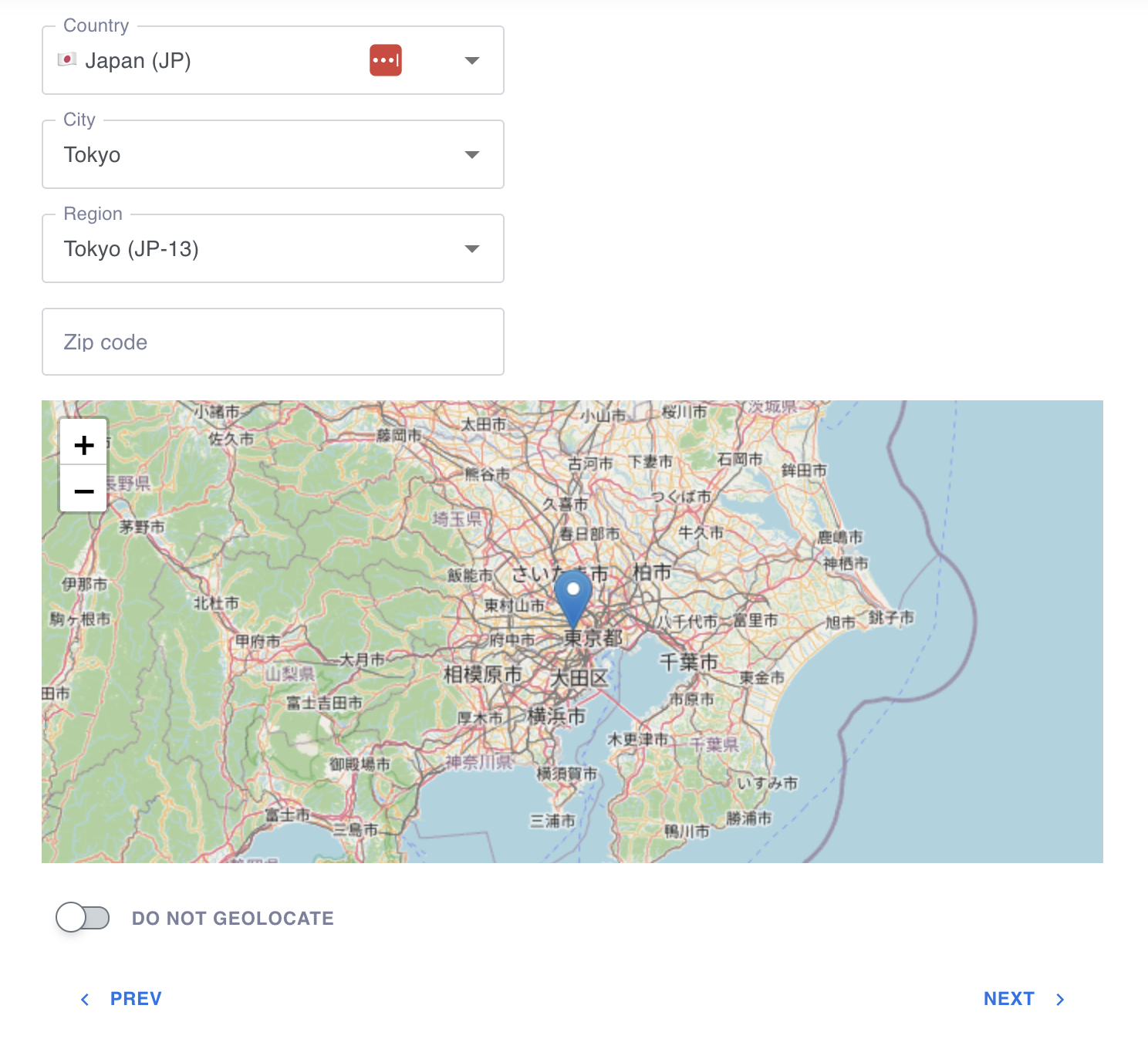
A wizard makes it easy to select a country and/or city. ISO codes are automatically generated to ensure the correct Geofeed format.
PacketVis automatically determines the ISO 3166-1 alpha-2 country code, ISO 3166-2 subdivision code, and city name, so you don’t need to look up geographic codes manually.
The wizard also identifies and links directly to the relevant inetnum or NetRange object in the Regional Internet Registry (RIR) database where the Geofeed reference must be configured. Simply copy the Geofeed URL provided by the wizard, click the link to open the RIR portal directly at the relevant object, and paste the URL into the Geofeed, remarks, or comments field.
Geofeed files are generated automatically and can be hosted either by PacketVis or on your own infrastructure. With custom aliases, you can publish a PacketVis-hosted Geofeed under your company’s domain.
Centralized Geolocation Overview
Creating and publishing a Geofeed does not guarantee that geolocation providers will immediately reflect the declared location.
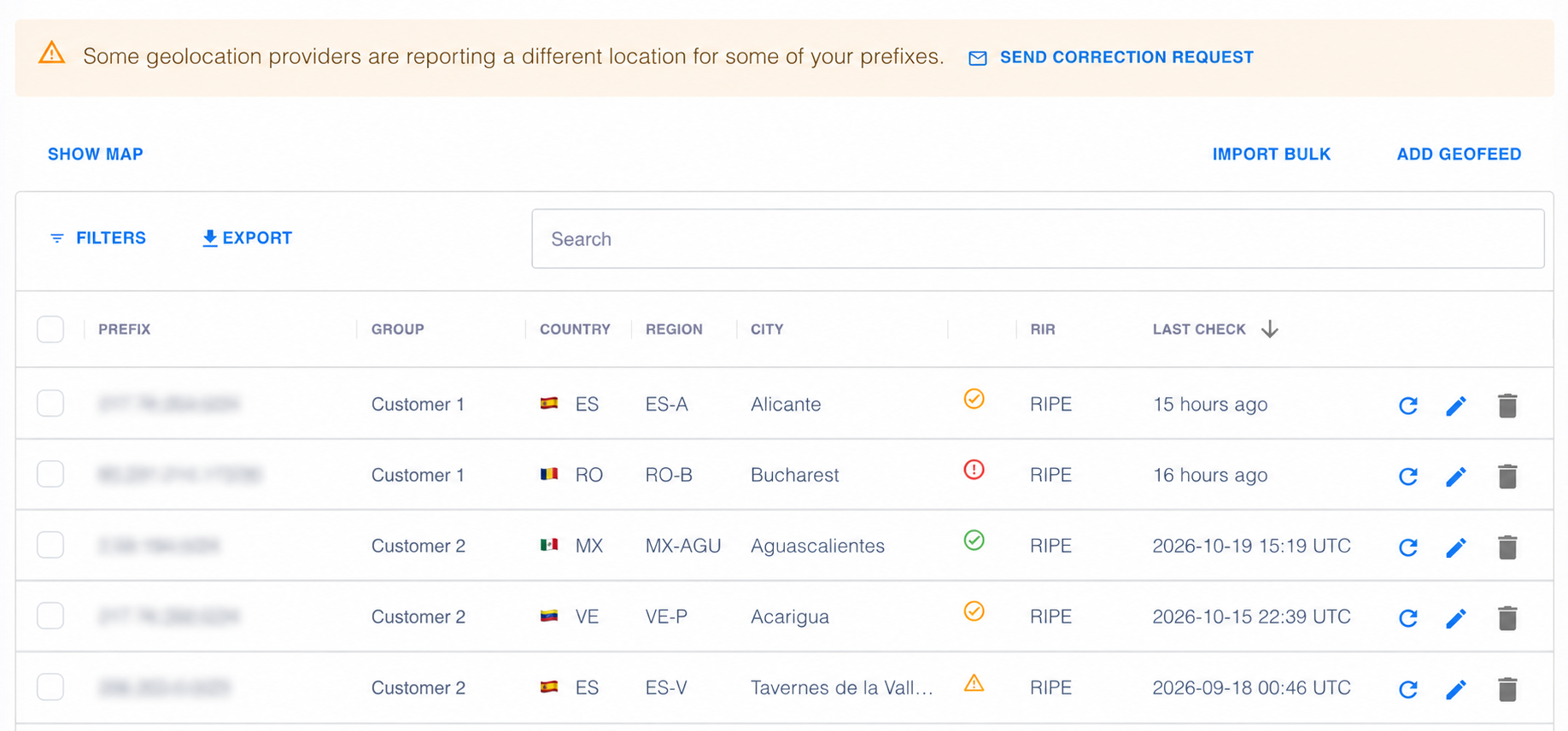
PacketVis provides a centralized dashboard showing the geolocation status of all managed IP addresses and prefixes on a single page.

The geolocation dashboard. View your IP resources and their configured Geofeed locations at a glance. Status icons indicate whether geolocation providers have adopted the specified locations. Click the refresh icon to retrieve the latest data from geolocation providers, or the pencil icon to edit and test your Geofeed. At the top, you can also send correction requests by email to geolocation providers that persist in not updating their data.
For each resource, you can compare the location declared in its Geofeed with the locations currently reported by geolocation providers.
When a provider’s reported location matches the declared location, the resource is marked as in sync in the dashboard. For organizations managing large address inventories, this significantly reduces the effort required to identify geolocation inconsistencies.
A yellow or red icon in the geolocation dashboard indicates that some providers report a location different from the expected one. By clicking the icon, you can open a dialog that shows the current geolocation reported by each provider for the specific IP resource.
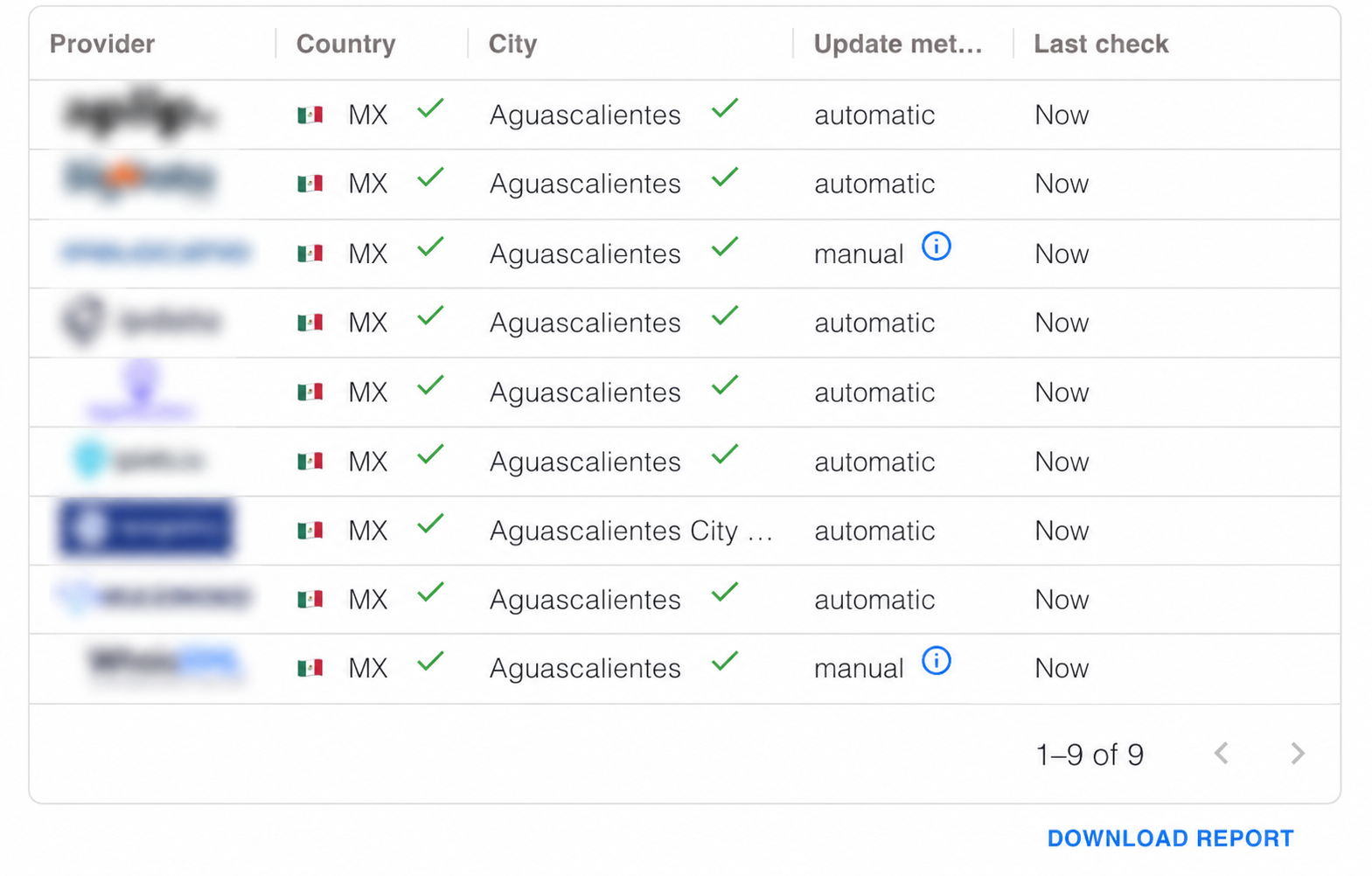
A dialog displays the current geolocation reported by each geolocation provider for a specific IP resource. Discrepancies are highlighted in the dialog.
PacketVis also provides a PDF geolocation report for each managed resource, showing both the location declared in the Geofeed and the locations reported by geolocation providers. These reports have proven particularly useful during IP leasing negotiations.
If geolocation providers have not updated their records, PacketVis lets you send correction requests automatically to multiple providers.
Correction requests will be sent to geolocation providers to help them investigate why the geolocation has not been updated or initiate a conversation with the customer to clarify why the new data has not been accepted.
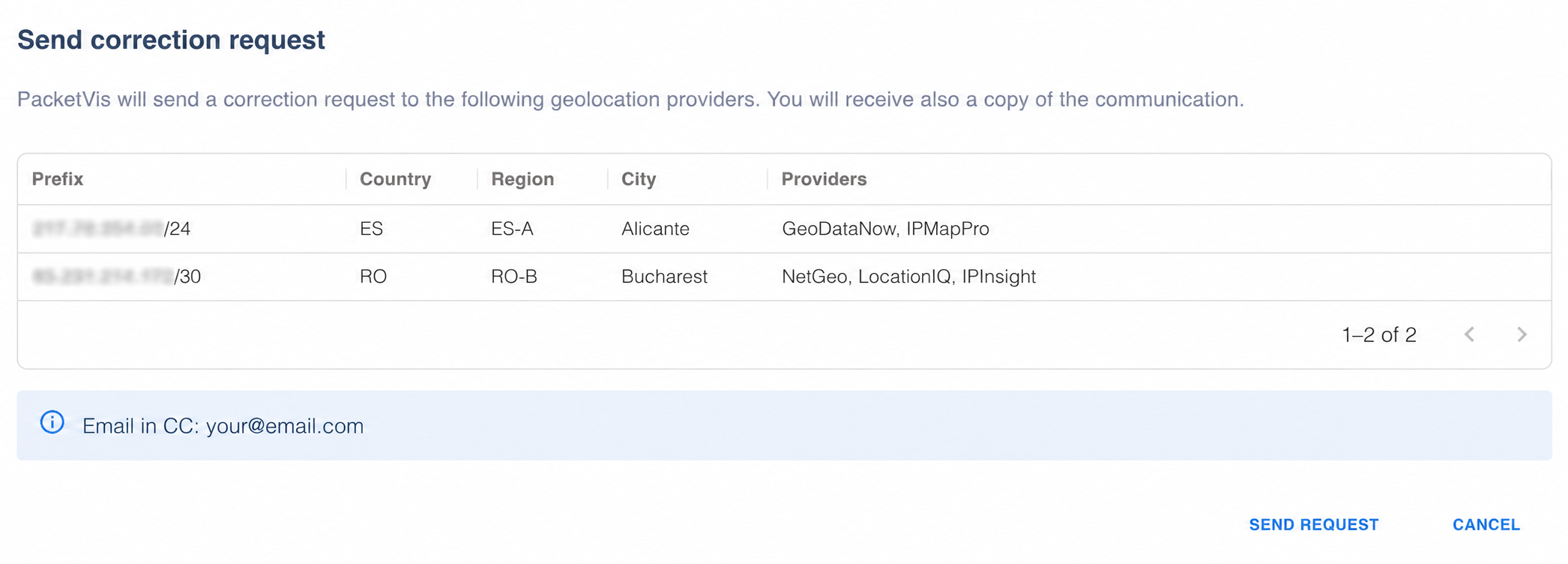
The correction request dialog provides a summary of the incorrectly geolocated IP resources, their expected locations, and the geolocation providers that will receive the correction request.
Correction requests contain the information providers need to validate the requested changes. To prevent excessive requests, safeguards are in place to encourage bulk submissions and avoid repeated requests about the same IP resources.
Sending a correction request does not replace RFC compliance. Without it, geolocation providers may be unable to verify ownership of IP resources and process the requested corrections. Therefore, correction requests are unavailable for non-compliant resources. All Geofeed resources managed through PacketVis are automatically RFC-compliant.
Bulk Geofeed Management
Managing hundreds or thousands of IP prefixes individually is impractical. PacketVis supports bulk operations through CSV uploads or REST APIs. Upload an existing Geofeed CSV file to start monitoring the geolocation of your IP prefixes or verify that the Geofeed is correctly configured for each prefix in the file.
PacketVis will report common CSV issues and suggest solutions, such as invalid ISO codes or city names. After uploading, a summary will highlight any entries containing errors.
Geofeeds can also be organized into groups, such as one group per customer. For IP leasing providers, this makes it easier to manage customer assignments and remove geolocation entries when a lease ends. REST APIs can be used to integrate PacketVis’ solution with your customer portal.
PacketVis administrators can define organization-wide policies that apply to all team members, including:
- Whether Geofeeds must be hosted by PacketVis.
- Whether to use a custom domain as an alias for the file.
- Whether Geofeeds must be consolidated into one file or published separately per inetnum/NetRange.
Automate Everything with REST APIs
PacketVis REST APIs let you integrate Geofeed management and monitoring into existing systems without relying on the web interface.
Create, update, and retrieve Geofeeds programmatically.
1
2
3
4
5
6
7
8
9
10
11
12
13
14
15
16
17
18
19
20
{
    "data": [
        {
            "prefix": "192.0.2.0/25",
            "country": "IT",
            "region": "IT-62",
            "city": "Rome",
            "zip": null,
            "group": "customer1"
        },
        {
            "prefix": "198.51.100.0/28",
            "country": "JP",
            "region": "JP-13",
            "city": "Tokyo",
            "zip": null,
            "group": "customer2"
        }
    ]
}
Example JSON payload for retrieving, creating, or updating geofeeds using GET and PUT requests. The format supports multiple geofeeds in a single request.
Retrieve the geolocation status of managed resources, including both declared Geofeed locations and data reported by geolocation providers.
1
2
3
4
5
6
7
8
9
10
11
12
13
14
15
16
17
18
19
20
21
22
23
24
25
26
27
28
29
{
    "data": [
        {
            "prefix": "192.0.2.0/24",
            "country": "US",
            "region": "US-FL",
            "city": "Boca Raton",
            "monitored": true,
            "providersDataStatus": "partially-synced",
            "citySyncErrorPercentage": 50,
            "results": [
                {
                    "provider": "Provider 1",
                    "country": "US",
                    "city": "Boca Raton",
                    "countrySync": true,
                    "citySync": true
                },
                {
                    "provider": "Provider 2",
                    "country": "US",
                    "city": "Miami",
                    "countrySync": true,
                    "citySync": false
                }
            ]
        }
    ]
}
The following abbreviated response illustrates a discrepancy between the declared location and one provider's data.
See the Geofeed API documentation for the complete list of endpoints and instructions.
Get started! Create your first Geofeed. Whether you manage a few prefixes or thousands of resources across multiple customers, PacketVis helps simplify Geofeed management and keep you informed about how your IP addresses are geolocated.
Have feedback, suggestions, or questions? We’d love to hear from you.